RQL Syntax Highlighting
RetractorDB query files have the .rql extension. The repository ships ready-made syntax-highlighting definitions for three environments: Visual Studio Code, Vim, and the bat/batcat tool. All the necessary files live in the project’s scripts/ directory.
Visual Studio Code
The rql-vscode extension adds full RQL language support to VS Code: syntax highlighting, recognition of the .rql extension, and a file icon.
Installing from the GitHub repository:
git clone https://github.com/michalwidera/rql-vscode.git
cd rql-vscode
npm install
npm run compile
code --install-extension *.vsix
If the repository contains a ready-made .vsix file, you can skip compiling and install it directly:
code --install-extension rql-vscode-*.vsix
After installation, VS Code automatically recognizes .rql files and applies syntax highlighting. No user-settings changes are needed.
Example of a highlighted query in VS Code:
STORAGE 'temp'

DECLARE a INTEGER STREAM core0, 0.1 DEVICE '/dev/urandom'

# Select a column and half of it
SELECT core0[0], core0[0] / 2 STREAM str1 FROM core0
Fig. 64. RQL syntax highlighting in the Visual Studio Code editor
As shown in Fig. 64, keywords (STORAGE, DECLARE, SELECT, FROM) are highlighted as commands, and data types (INTEGER) as types. In current RQL, # starts a comment only as the first non-whitespace character of a whole line; inside a FROM clause it is always the interleaving operator. A line-ending comment starts with //, and a block comment has the form /* ... */. The highlighting definition should preserve this distinction.
Vim
The repository contains two Vim files in the scripts/.vim/ directory:
| File | Description |
|---|---|
scripts/.vim/syntax/rql.vim | Definition of the syntax groups and their color assignments |
scripts/.vim/ftdetect/rql.vim | Automatic filetype detection by the .rql extension |
Installing via buildrdb.sh
The most convenient method - the script copies both files into the appropriate ~/.vim/ subdirectories:
scripts/buildrdb.sh vimsyntax
The script creates any missing directories and reports the destination location:
-- RetractorQL vim syntax installed to /home/user/.vim
Installing via CMake
The vimconf target from scripts/CMakeLists.txt copies the entire .vim directory into the home directory:
cmake --build build --target vimconf
Manual installation
mkdir -p ~/.vim/syntax ~/.vim/ftdetect
cp scripts/.vim/syntax/rql.vim   ~/.vim/syntax/
cp scripts/.vim/ftdetect/rql.vim ~/.vim/ftdetect/
After installation, Vim automatically activates highlighting for every file with the .rql extension. The file ftdetect/rql.vim contains a single line:
au BufRead,BufNewFile *.rql set filetype=rql
Highlighted elements
| Vim group | Examples |
|---|---|
Keyword | SELECT, DECLARE, STREAM, FROM, BINFILE, TEXTFILE, DEVICE, FILE, RULE, ON, WHEN, DO |
PreProc | STORAGE, ROTATION, SUBSTRAT |
Operator | AND, OR, NOT |
Constant | MEMORY, POSIX, DIRECT, GENERIC |
Type | INTEGER, FLOAT, BYTE, CHAR, UINT, STRING, DOUBLE |
Function | MIN, MAX, AVG, SUMC, Sqrt, Abs, Length, null2zero |
Comment | # comment, // comment, /* block */ |
String | 'path/to/file.dat' |
Number | 42, 3.14, 1/2, 1e5 |
Example query file with highlighted fragments:
DECLARE a UINT STREAM core0, 1 TEXTFILE 'datafile1.txt'
DECLARE a UINT STREAM core1, 2 TEXTFILE 'datafile2.txt' ONESHOT

SELECT str4[0] STREAM str4 FROM core0#core1

RULE regulation1 \
ON str4 \
WHEN str4[0] = 20 OR str4[0] = 23 \
DO SYSTEM 'echo "test"'
The text view in the vim editor is shown in Fig. 65.
Fig. 65. RQL syntax highlighting in the vim editor
bat / batcat
The bat tool (available as batcat on some distributions) is an improved cat replacement with built-in syntax-highlighting support. It supports Sublime Text 3 format syntax definitions, which the RetractorDB repository provides at scripts/sublime/retractorql.sublime-syntax.
Prerequisite
Make sure bat is installed:
# Debian/Ubuntu
sudo apt-get install bat

# Check which command is available (may be bat or batcat depending on the distro)
command -v batcat || command -v bat
Installing via buildrdb.sh
scripts/buildrdb.sh batsyntax
The script automatically detects the command (bat or batcat), copies the syntax file into the correct config directory, and rebuilds the syntax cache:
-- RetractorQL syntax installed to /home/user/.config/bat/syntaxes
Manual installation
# Detect the command name
BAT=$(command -v batcat || command -v bat)

# Create the directory for syntax definitions
mkdir -p "$($BAT --config-dir)/syntaxes"

# Copy the definition
cp scripts/sublime/retractorql.sublime-syntax "$($BAT --config-dir)/syntaxes/"

# Rebuild the cache
$BAT cache --build
Usage
After installation, bat automatically highlights .rql files:
bat query.rql
The .desc extension (stream descriptor files) is also recognized. Highlighting can be forced manually if the file has a different extension:
bat --language rql any-file.txt
Verifying the installation - available languages:
bat --list-languages | grep -i rql
# RetractorQL:rql,desc
Example invocation
For a file query.rql containing:
STORAGE 'temp'

DECLARE a INTEGER STREAM core0, 0.1 BINFILE 'datafile2.dat'

SELECT str1[0] STREAM str1 FROM core0

RULE testrule1 ON str1 WHEN str1[0] < 15 DO DUMP -5 TO 5
RULE testrule2 ON str1 WHEN str1[0] > 11 DO DUMP -5 TO 5 RETENTION 100

RULE testrule3 \
ON str1 \
WHEN str1[0] = 13 OR str1[0] = 11 \
DO SYSTEM 'echo "systemcall"'
Running bat query.rql displays the file’s content with line numbers and syntax highlighting in the terminal, where keywords, types, comments, and string literals get distinct colors according to bat’s active theme (Fig. 66).
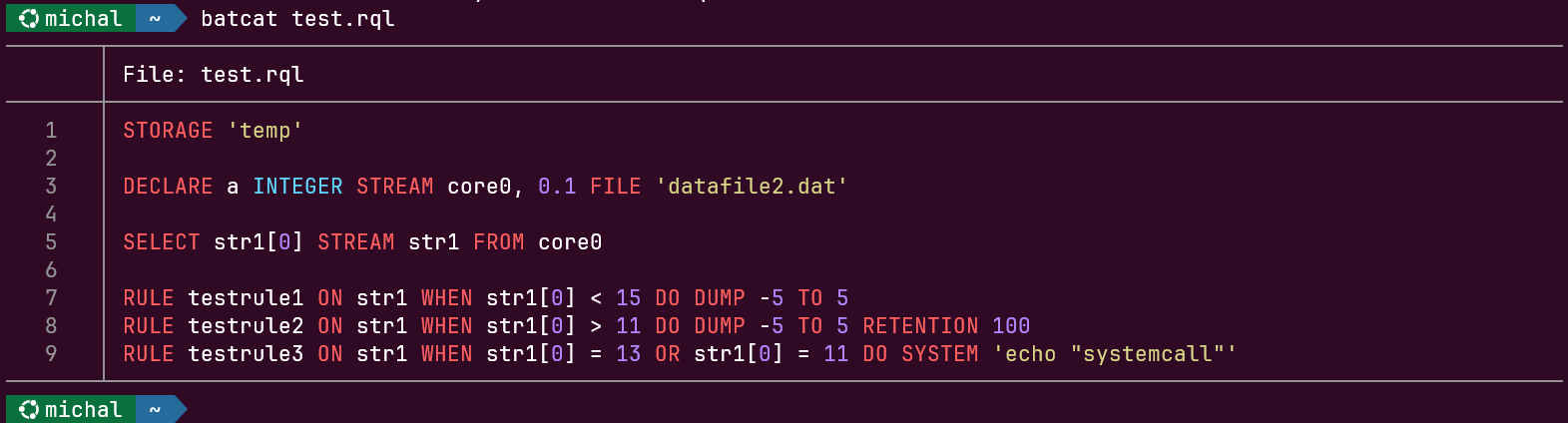
Fig. 66. RQL syntax highlighting in the terminal - the batcat command