Compilation and Plan Construction
The compilation process happens before every run of the xretractor process, provided a file with a sequence of commands and queries was given. That argument is required in -c mode (compile only) - without it there is nothing to compile; in processing mode, omitting it starts idle mode, where the compilation stage is skipped entirely. Based on the flow shown in Fig. 14, I prepared a description of the process in Fig. 26, showing the compilation process in development mode. Compilation itself can run independently of live instances. In execution mode, reusing the same instance name is rejected, while another name starts a separate plan unless the bus detects a collision in its streams, storage files, or rotation counter.
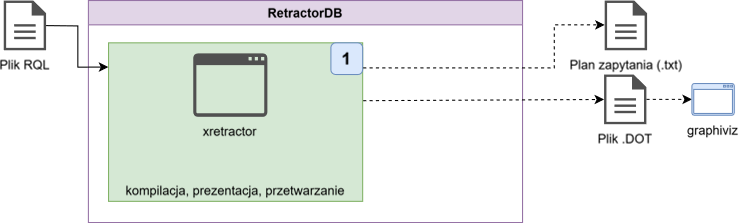
Fig. 26. The compilation process
As an example file for compilation, we’ll use a file query.rql with the following content:
DECLARE a INTEGER STREAM core0, 0.1 BINFILE 'datafile1.dat'

SELECT str1[0]+1 STREAM str1 FROM core0>2
This is a very simple example of a file containing two directives. The first declares the existence of an ephemeris in the form of a binary data source containing 4-byte INTEGER values. Data from this file will be read at a rate of 10 times per second. And the name of this object is core0.
The second command creates an artifact named str1, taking ephemeral data shifted in time by two reads, i.e. 0.2 seconds. While building successive elements of the output stream, the data read from core0 is processed, and the value 1 is added to every value read.
To compile this file, the following command must be invoked:
$ xretractor -c query.rql
The following system response will be printed on the screen:
core0(1/10)	datafile1.dat
	a: INTEGER
str1(1/10)	origin=2
	:- PUSH_STREAM(core0)
	:- STREAM_TIMEMOVE(2)
	str1_0: INTEGER
		PUSH_ID(str1[0])
		PUSH_VAL(1)
		ADD
Omitting -c compiles the plan and attempts to run it. A missing source file, datafile1.dat, stops startup with an environment error, K4, code EIO (5 on Linux), and a message naming the stream, path and cause. Compile-only mode (-c) does not require input data to be present. Startup also requires an existing storage directory and valid retained descriptors; see xretractor for checks and refusal codes.
Besides the text view, we can also look at the compilation output in graphical form. To do this, invoke the following sequence of commands:
$ xretractor -c -d -f -t -s query.rql > out.dot && dot -Tsvg out.dot -o out.svg
Assuming you have the dot program from the graphviz package installed in your runtime environment, this command will generate an image file showing the system’s response in the form of a graph.
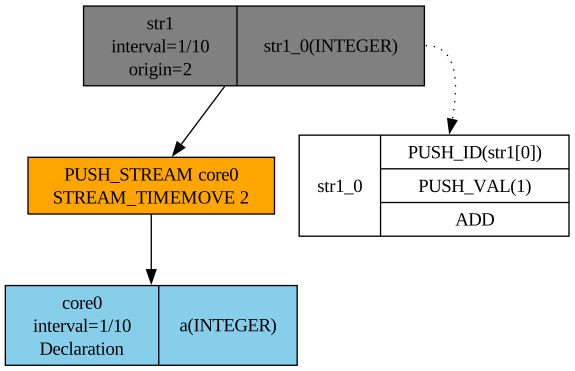
Fig. 27. Graphical representation of a query plan
RetractorDB can generate an image in response to one of the requested data-processing chains. The graphical presentation is most suitable for creating and presenting data-processing graphs. Unfortunately, readability suffers for very complex schemas.
Fig. 27 shows the trivial query execution plan produced by compiling the two-line query.rql file. At the very top we see the object str1, producing artifacts at a rate of 10 records per second. Information about the artifact-creation rate does not appear in the query; it is computed based on the algebraic expression in the FROM clause of the SELECT query. We can also see how successive records of the str1 stream are produced. Here we have a typical stack-based data-processing algorithm. First, the ephemeral value produced by the algebraic expression is pushed onto the stack, then the value 1 is placed on the stack. The ADD instruction pops both values off the stack, leaving the sum on the stack. What remains on the stack - i.e. the result of the addition - is placed into the field of the record being created.
On the other side we see stream operations. Stream operations are carried out in a different domain. There, we process objects of one or two values. Operations act either on two streams, or on a single stream with an argument. The classic stack has no application for algebraic stream operations. For simplicity, the notation resembles stack operations somewhat. We see, in the attached example, that operations on current data are carried out by shifting the data in time by 2. I deliberately do not say that this is 2 seconds - here 2 denotes a relative value with respect to the arrival rate. For an arrival rate of 10 samples per second, the value 2 means a time shift of 0.2 seconds.
Complex algebraic expressions involving at least two stream operators give rise to the substrates mentioned in previous chapters. Every query whose FROM-clause algebraic expression contains more than one operator is broken down into interdependent two-argument operations. The substrate’s argument list is, by default, the full expansion of the schema.
Available xretractor flags
Different sets of flags are available in compile mode (-c) and in execution mode. Below are the compile-mode flags used for generating graphs:
| Flag | Full name | Meaning |
|---|---|---|
-c | --onlycompile | compile only - does not start processing |
-d | --dot | generate output in DOT (graphviz) format |
-f | --fields | show stream fields in the DOT graph |
-t | --tags | show individual field programs (requires -f) |
-s | --streamprogs | show stream programs in the DOT graph |
-u | --rules | show RULE rules in the DOT graph |
-p | --transparent | transparent background for the DOT graph |
-i | --hideruleprog | hide the rule-condition program (with -u) |
-m | --csv | output in CSV format |
Execution-mode flags (without -c):
| Flag | Full name | Meaning |
|---|---|---|
-m N | --llimitqry N | run N processing cycles, then exit |
-k | --noanykey | don’t wait for a keypress - daemon/script mode |
-t | --realtime | real-time mode (SCHED_FIFO, mlockall) |
-x | --xqrywait | wait until the first xqry command has been handled before starting |
-s | --status | check whether an xretractor instance is already running |
-v | --verbose | print stream parameters at startup |
-j | --service | service mode - log to stderr (journald) |
-g F | --config F | TOML configuration file instead of the search order |
-b | --build-info | print the optimizer configuration and exit |
ℹ️ Info
The
-m Nparameter counts iterations of the main loop, not seconds. For streams with a 0.1 s interval (10 Hz),-m 10means ~1 second of processing.
⚠️ Warning
When receiving the results of a run limited by
-m Nthroughxqry, add-x(--xqrywait). Without this flag, the server may process the entire budget before the client connects. The gate is released after the first command has been handled:xqry --selectregisters its subscription before computation starts. Another client’s--diror--helloalso releases the gate, so it is not a readiness barrier for all receivers. When inspecting artifacts after the process has finished,-xis not needed and will hold up the run if no client command arrives.
A full list of all options with a description of each - including the --realtime option, which requires system privileges - can be found in Appendix A.